
Best Practices for Dash Cam Data Management
Reduce storage costs, speed footage retrieval, secure transfers and stay GDPR-compliant with practical dash cam data strategies.

Dash cam data is more than just video - it's a tool for improving safety, reducing costs, and staying compliant. Poor management can lead to high storage expenses, wasted time, and even fines for non-compliance. Here's how to manage your dash cam footage efficiently:
- Reduce Storage Costs: Use event-based recording, modern codecs like H.265, and AI-driven clipping to save space without losing critical footage.
- Choose the Right Storage: Combine cloud and local storage for cost-effective, secure management. Use high-endurance SD cards and set tiered retention periods.
- Streamline Retrieval: Enable metadata tagging and role-based permissions for quick, secure access to footage.
- Ensure Compliance: Follow GDPR rules by automating deletions, defining retention policies, and encrypting data transfers.
Smart data strategies not only save time and money but also protect your fleet from legal risks while improving operational efficiency.
Video Compression Checklist
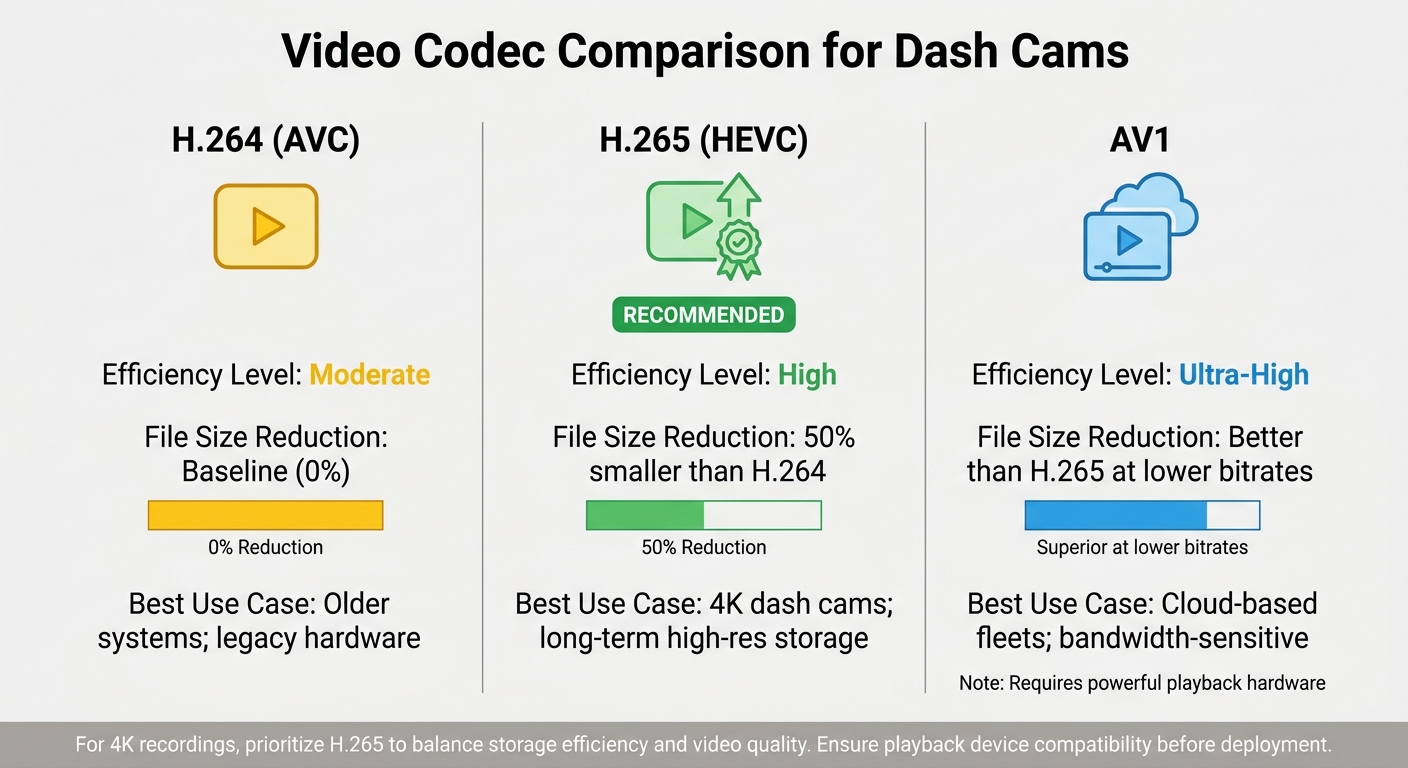
Video Codec Comparison for Dash Cam Storage Efficiency
Cutting down on storage costs and bandwidth while keeping incident-critical video quality intact is key when managing dash cam footage. Compression plays a central role here, ensuring data management is efficient without sacrificing the details that matter most. Let’s explore some practical ways to optimise video compression for dash cams.
Use Event-Based Recording
Event-based recording ensures that footage is only captured during specific triggers, such as harsh braking, sudden acceleration, speeding, or collisions. This approach focuses on storing incident-relevant footage, which not only reduces storage needs but also saves time when reviewing footage.
You can customise trigger settings by adjusting g-force thresholds or speed limits. Additionally, configure your system to save all footage locally while uploading only high-priority event clips to the cloud. This way, you optimise bandwidth while keeping a backup of all recordings. As SureCam highlights:
"Each SureCam client can customise their trigger settings to make sure that they only receive the videos that matter to them. This makes the management process straightforward and saves you time reviewing insignificant videos".
Choose Modern Video Codecs
The type of codec your dash cam uses has a direct impact on file size and storage requirements. For instance, H.265 (HEVC) can shrink file sizes by up to 50% compared to H.264 while maintaining video quality. This makes it a go-to option for 4K recordings. For fleets relying on cloud-based van tracking solutions, the AV1 codec offers even better compression efficiency at lower bitrates, though it requires more powerful playback hardware.
| Codec | Efficiency | Best Use Case |
|---|---|---|
| H.264 (AVC) | Moderate | Older systems; legacy hardware |
| H.265 (HEVC) | High (50% better than H.264) | 4K dash cams; long-term high-res storage |
| AV1 | Ultra-High | Cloud-based fleets; bandwidth-sensitive |
Before deploying H.265 or AV1, ensure playback devices are compatible. For 4K recordings, prioritise H.265 to balance storage efficiency and video quality.
Enable AI-Driven Clipping
AI-powered dash cams process video locally, identifying and uploading only the footage triggered by specific risks like distracted driving, drowsiness, or tailgating. This eliminates the need for constant cloud uploads, significantly reducing data transfer. AI systems can deliver real-time alerts - such as detecting mobile phone use or fatigue - in under 200 milliseconds.
Beyond compression benefits, AI clipping can help lower insurance premiums and reduce accidents. By setting custom thresholds based on factors like vehicle load or operational context, you can ensure only genuine risks trigger recordings. Use tiered storage to upload high-severity events to the cloud immediately, while keeping minor incidents on local storage for a shorter time.
Implement Variable Bitrate Encoding
Variable bitrate (VBR) encoding adjusts compression levels dynamically based on motion and scene complexity. For example, when a vehicle is stationary or driving on an empty motorway, the bitrate drops to save storage. During high-motion events, the bitrate increases to maintain video clarity.
This approach is far more efficient than fixed bitrate encoding, especially for cellular uploads. It reduces file sizes during routine driving while ensuring high-quality footage during critical moments. Configure your VBR settings to prioritise quality during incidents and maximise compression during everyday driving scenarios.
sbb-itb-499a7f0
Storage Solutions Checklist
Choosing the right storage solution is essential for safeguarding crucial footage while keeping costs in check. Your decision - whether cloud, local, or hybrid storage - should align with your operational needs, fleet size, and legal obligations. Use the checklist below to fine-tune storage strategies for your fleet.
Adopt Cloud-Based Storage
Cloud storage offers a reliable way to secure and access footage remotely. For vehicles in the field, cloud uploads can prevent footage from being overwritten. However, the costs can add up. For example, monthly fees range from £15–£25 per camera, which translates to £18,000–£30,000 annually for a fleet of 100 vehicles.
A smaller fleet of 50 vehicles equipped with AI cameras might generate 400–600 hours of flagged footage per month, increasing the risk of costly data overage charges. To avoid this, limit cellular uploads to critical events - such as collisions, harsh braking, or AI alerts - and prioritise Wi‑Fi offloading whenever possible. This approach helps manage costs while ensuring essential footage is preserved.
Use High-Endurance SD Cards
If you’re relying on local or hybrid storage, investing in high-quality SD cards is a must. Opt for Class 10, UHS-I (or higher) cards with capacities ranging from 128 GB to 512 GB. To maintain reliability:
- Format the cards monthly.
- Conduct weekly tests to ensure timestamps are accurate.
- Inspect cards immediately if any malfunctions occur.
Keeping monthly logs can help identify recurring issues and ensure your storage system remains dependable.
Set Tiered Storage Plans
Tailoring storage plans to your fleet’s size and usage patterns is key. Establish clear retention periods based on the type of footage:
- Accident or incident footage: Retain for 3–5 years.
- Routine driving footage: Keep for 30–90 days.
- Driver behaviour footage: Store until coaching is completed.
A hybrid storage setup works well for many fleets. For instance, maintaining 50 hours of continuous local storage while uploading critical events to the cloud can reduce total ownership costs by 40%–60% over three years.
"A camera system that can't produce footage when it matters, or that generates surprise bills every month, undermines the entire investment."
Finally, review vendor contracts carefully to ensure auto-deletion policies comply with legal and insurance retention requirements. This step helps avoid unnecessary complications and ensures your storage solution supports your operational and compliance needs.
Data Retrieval and Access Checklist
Getting dash cam footage when you need it requires a balance between easy access and strong security. A good system ensures authorised personnel can quickly find the recordings they need while safeguarding sensitive driver data from unauthorised access or tampering.
Enable Role-Based Permissions
Controlling access to footage is key to protecting privacy and staying compliant. Connected cameras with cloud-based management systems reduce the risk of tampering.
Set up access levels based on roles. For example, safety managers should have immediate access to high-priority incidents, like collisions, while lower-priority footage can be used for routine driver coaching. Adding audit trails to track who views footage and when ensures accountability for every retrieval. For larger fleets handling a high volume of video alerts, customised software might be needed to define specific user permissions.
For training purposes, anonymise materials by using still images from footage and blurring faces or other identifying details. As SureCam explains:
"Stills can be useful because it is easy to cover a driver's face or other personally identifying details using easy-to-use computer software, such as Microsoft Paint or a word processor."
These permission controls form the groundwork for efficient and secure searches using metadata.
Use Searchable Metadata
Metadata transforms hours of video into accessible, actionable evidence. Web-based portals let you search and filter recordings by date, time, or vehicle ID. Automatic tagging during key events, such as collisions, ensures critical footage is prioritised. GPS coordinates and driver information embedded in metadata link video evidence to specific locations and personnel, which is especially helpful when defending against false claims across various industries at a particular site or intersection.
Configure dash cams to automatically tag event-triggered footage, such as clips activated by G-sensors. This ensures important incidents are prioritised without the need to sift through unrelated footage manually. It also limits access to irrelevant driver data, keeping privacy intact. Mobile apps allow field supervisors to perform metadata-based searches on the go, speeding up the review process.
By streamlining tagging and retrieval, fleet managers can improve efficiency and compliance. Once metadata is properly organised, the next step is securing how that data is transferred.
Secure Data Transfers
Secure transfers and regular updates are essential for protecting data and maintaining its integrity. As Safety Track highlights:
"Dash cam data contains sensitive video, GPS data, and driver information. This makes secure video access and encryption critical for fleet protection."
Encrypt video transfers and keep firmware up to date to close potential security gaps. Training both drivers and managers on proper data handling protocols can also help prevent accidental unauthorised access.
Data Retention and Deletion Checklist
Managing data retention effectively can help reduce storage costs and minimise the risk of regulatory breaches. Under UK GDPR Article 5(e), personal data must not be kept for longer than necessary to fulfil its original purpose. Without clear retention policies, fleets could face penalties and incur unnecessary storage expenses.
Here’s a practical checklist to help you manage retention and deletion efficiently.
Define Retention Periods
Retention periods should align with the purpose for which the data was collected. For example, the ICO advises a 30-day retention period for routine CCTV or surveillance footage unless it is needed for an ongoing investigation. On the other hand, recordings of incidents or accidents may need to be kept for up to 6 years, following the Limitation Act 1980, which governs the time limit for tort and contract claims in the UK.
A tiered approach often works best:
- Routine driving footage: Retain for 30–90 days.
- Incident-related footage: Retain for 3–6 years.
Document your retention policies and conduct a Data Protection Impact Assessment (DPIA) to ensure these timeframes are justified.
Automate Scheduled Deletions
Once retention periods are set, automate the deletion process to avoid manual errors. Manual methods can be unreliable, so use tools like time-to-live settings or automated purges available in dash cam management software. As PolicySuite notes:
"A retention schedule that describes the correct periods but is not operationalised in any system is evidentially worthless."
Ensure your system archives incident footage while automatically purging routine data. Maintain consistent retention rules across all storage platforms - whether in the cloud, local storage, or backups - to prevent data lingering in unmanaged archives.
Additionally, establish a legal hold procedure to pause routine deletions when litigation, regulatory actions, or internal investigations are expected. Clearly define who (e.g., the General Counsel or Data Protection Officer) has the authority to issue such holds and under what circumstances. Keep a detailed audit trail documenting when and how data is deleted, as this is crucial for responding to subject access requests or audits. Remember, deletions that aren't recorded can't be evidenced.
Ensure GDPR Compliance
Effective retention and deletion policies must also adhere to GDPR requirements. Fleet managers are required to register as data controllers with the ICO and pay an annual data protection fee - typically £52 per year for small businesses. It's vital to document a lawful basis for processing video and audio data and to provide a clear privacy notice explaining how this data is used.
Since recording audio is particularly intrusive, it should remain off by default and only be activated manually in exceptional situations. Display clear signage inside and outside vehicles to inform individuals about ongoing recordings and provide contact details for the data controller. If no incident has occurred and there’s no valid reason to retain the footage, the ICO advises deleting it within a short timeframe - usually about a week.
When working with third-party providers, include Data Processing Agreements (DPAs) that require the return or deletion of data once the service ends. Lastly, if footage is fully anonymised (e.g., all faces and number plates are permanently blurred), it no longer falls under GDPR retention rules.
Security Best Practices Checklist
Dash cam footage contains sensitive details like video, GPS data, and driver information. Without proper safeguards, this data could be exposed to cyber threats, leading to regulatory penalties or even legal action. To avoid these risks, fleet managers need to implement robust security measures, including encryption, secure upload protocols, and regular firmware updates. Here's a checklist to help protect your dash cam data.
Apply End-to-End Encryption
Encryption is essential for protecting data both during storage and transfer. Whether the data is stored on SD cards or cloud servers (data at rest) or being uploaded from vehicles (data in transit), encryption ensures it remains secure from unauthorised access. As Safety Track highlights:
"All stored and transferred video should be encrypted".
Pairing encryption with role-based permissions adds another layer of protection, ensuring only authorised individuals can access or decrypt the footage. Audit trails should also be in place to monitor who views or downloads specific files. Additionally, make sure auto-upload settings are properly configured to minimise potential risks.
Configure Auto-Upload Security Settings
Auto-upload features offer convenience but can create vulnerabilities if not set up correctly. Before enabling this function, ensure the connection between the dash cam and the cloud uses encrypted protocols. This prevents data from being intercepted during transmission.
Regularly review your upload settings to ensure that only authorised devices can send data to your storage system. This practice helps reduce the risk of unauthorised access. To further strengthen your system, stay on top of firmware updates.
Maintain Firmware Updates
Firmware updates from manufacturers are designed to fix security flaws and enhance device performance. Failing to install these updates leaves devices vulnerable to known exploits. Regularly updating firmware is a critical step in keeping your system secure and functioning as intended.
Conclusion
Managing dash cam data effectively can save money, protect your business, and improve fleet performance. By using event-based recording and advanced compression, you can avoid unnecessary storage costs while still capturing critical incidents. Whether you choose cloud-based, local, or hybrid storage, having reliable access to evidence is crucial for resolving accidents or disputes quickly.
Clear policies on data retrieval and retention can make a big difference to your bottom line. These strategies help reduce accident rates, lower insurance premiums, and speed up the resolution of incidents. Fast access to footage, combined with searchable metadata, allows you to address driver complaints and disputes efficiently - potentially saving thousands in payouts.
Security and compliance are essential. Protecting footage with encryption, regular firmware updates, and GDPR-compliant retention policies is a must. Automating the deletion of routine footage ensures storage is reserved for critical incidents, which should be retained for 3–5 years to support long-term legal needs.
Incorporating these practices into your dash cam data strategy can deliver impressive results. Fleets using AI-powered systems have reported up to a 30% reduction in accident rates, 58% lower insurance costs, 24% savings in fuel consumption, and a 15% cut in maintenance expenses. Turning raw footage into actionable insights leads to measurable improvements in operations.
For fleets looking to achieve these benefits, GRS Fleet Telematics offers innovative dash cam and telematics solutions tailored to enhance safety and efficiency across the UK.
FAQs
How do I calculate the cheapest retention plan for my fleet?
Figuring out the best retention plan for your fleet starts with understanding your specific storage needs. Consider factors like legal mandates, safety protocols, and operational requirements. These will shape how much data you need to store and for how long.
Next, explore storage options, such as scalable cloud solutions. Many of these services offer flexible pricing, with plans starting as low as £7.99 per vehicle per month. Calculate the costs carefully for your fleet to ensure you're getting the most value.
To keep expenses in check and stay GDPR-compliant, automate data deletion once the retention period ends. This not only saves money but also reduces the risk of holding unnecessary data.
By carefully balancing storage duration, overall costs, and compliance policies, you can pinpoint the retention plan that works best for your fleet's needs.
What’s the best hybrid setup for SD cards and cloud storage?
A well-balanced hybrid storage setup combines high-capacity SD cards for local storage with secure cloud storage for added protection. SD cards are perfect for uninterrupted recording, even when there's no internet connection. Meanwhile, essential footage can be uploaded to the cloud to ensure a backup is always available.
To make this system work efficiently, it's important to regularly compress and organise local files. This prevents storage from becoming cluttered and helps with quick retrieval. When choosing a cloud provider, look for those offering encryption and role-based access controls to keep your data secure.
Automating the transfer of files to the cloud and setting retention policies can make a big difference. These steps help maintain data integrity, ensure easy access when needed, and keep you compliant with any relevant regulations.
How can I stay GDPR-compliant without losing key evidence?
To comply with GDPR while keeping essential dash cam footage, you need to focus on transparency, secure handling of data, and having a lawful reason for recording.
Start by informing individuals that recording is taking place. This could be through clear signage or other notifications. Only collect the footage that's absolutely necessary for your purpose - no more, no less. Once collected, ensure the footage is encrypted both during storage and transmission. Encryption methods like AES-256 are a strong choice for protecting data from cyber threats.
It’s also vital to regularly review your privacy policies to ensure they align with GDPR requirements. For any high-risk data processing, conducting a Data Protection Impact Assessment (DPIA) is a smart move. Additionally, staff training is crucial - make sure your team understands data rights, including how to handle requests for access, correction, or deletion of footage.
By combining these practices, you can manage dash cam data responsibly while staying on the right side of GDPR regulations.