How to Fix IoT Connectivity Problems in Fleets
Step-by-step guide to diagnose, fix and prevent IoT connectivity problems in fleets: power, SIM/APN, hardware and maintenance.

IoT connectivity is the backbone of fleet management, ensuring vehicles stay visible, data flows seamlessly, and operations run smoothly. When connectivity fails, it can disrupt deliveries, compliance, and tracking. Here's how to address these challenges:
- Understand the system: Fleet IoT relies on van tracking solutions, SIMs, antennas, power, and cloud platforms. Issues can arise from any of these components.
- Diagnose systematically: Identify if the problem is device-specific or network-wide. Check power, SIM status, and signal quality.
- Fix common issues: Secure connections, verify APN settings, and refresh SIMs. Replace devices only when necessary.
- Prevent disruptions: Use modern hardware (4G LTE, LTE-M, NB-IoT), multi-network SIMs, and maintain devices regularly. Train staff to troubleshoot effectively.
Staying ahead of connectivity problems ensures reliable operations and reduces costly downtime.
IoT Maintenance & Troubleshooting: Complete Field Operations Guide for Device Health & Repairs
sbb-itb-499a7f0
How to Diagnose IoT Connectivity Problems
Fleet IoT Connectivity Troubleshooting: Step-by-Step Fix Guide
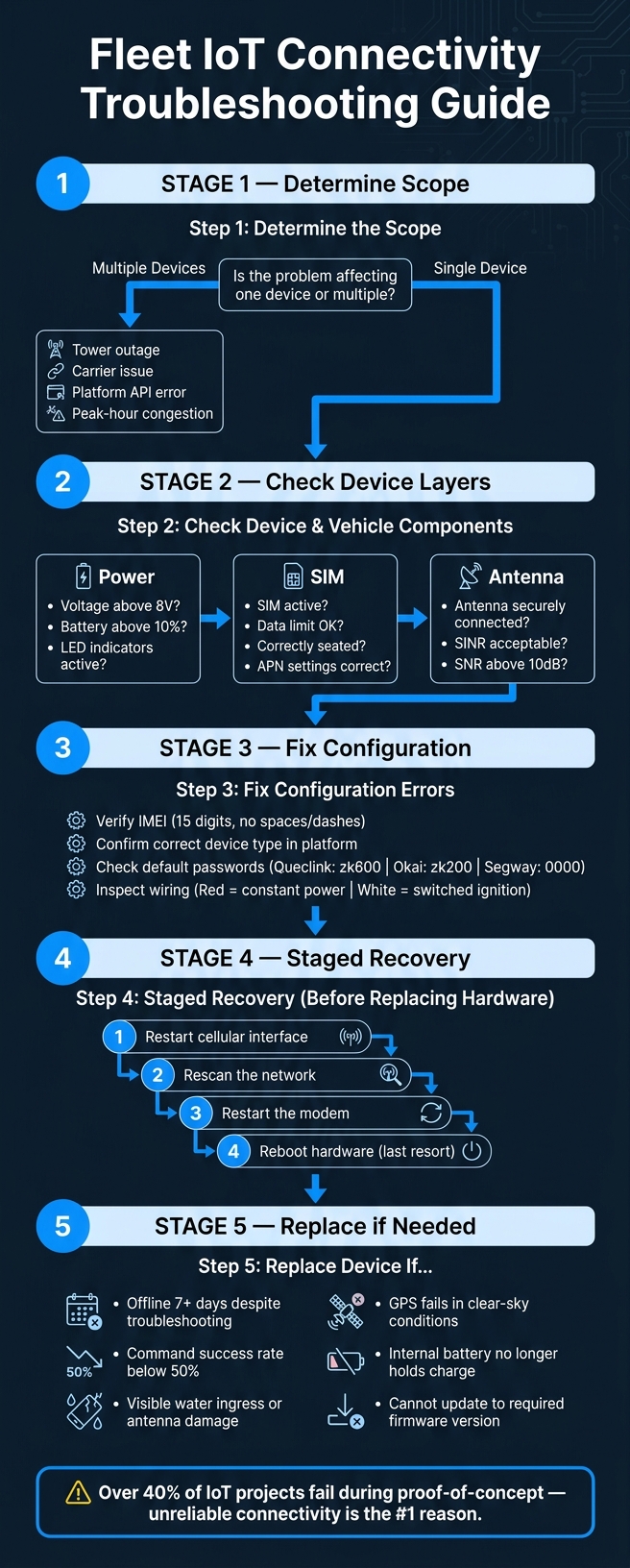
When dealing with IoT connectivity issues, jumping straight to hardware replacements or network resets can waste time and resources. Instead, take a systematic approach. Start broad, then narrow your focus to pinpoint the root cause efficiently.
Determining the Scope of the Problem
Begin by asking a straightforward question: is the issue affecting a single device or multiple devices? Check your dashboard's "last seen" timestamps to identify which vehicles are impacted. If several vehicles went offline simultaneously, it’s likely a network-level or platform-wide issue rather than a problem with individual hardware.
GPS data can also help. For example, if all affected vehicles are in the same postcode or industrial area, it might indicate a local cellular tower outage or a coverage gap, rather than a device fault. Additionally, if your platform has a system status page, check it for any reported outages before investigating further.
The table below outlines common symptoms and their likely causes, helping you focus your troubleshooting efforts:
| Symptom | Likely Scope | Potential Root Cause |
|---|---|---|
| Multiple devices offline in one area | Local/Regional | Tower congestion or carrier outage |
| Entire fleet shows "Connected" but no data | Fleet-wide | Server-side API or integration error |
| Single device shows "No Service" | Device-specific | SIM failure, antenna disconnect, or flat battery |
| Devices stop reporting at the same time daily | Network/Environmental | Peak-hour congestion or RF interference |
Once you've determined the issue's scope, you can decide whether to investigate network or platform problems or focus on individual devices.
Checking Devices and Vehicle Components
If the problem isn’t fleet-wide, it’s time to examine individual devices. Check each layer step by step: power, SIM, and antenna.
Start with the device's LED indicators. No lights at all usually mean a complete power failure, while blinking patterns can indicate whether the device is searching for a network or connected but unable to transmit data. For hard-wired devices, ensure the external voltage is above 8V. Remember, many telematics units rely on two power sources: the vehicle's main battery and an internal backup. If the vehicle battery drops below 10%, the IoT module might shut down to conserve power.
A simple SIM swap test can also be revealing. Insert a known working SIM card into the problematic device. If it connects successfully, the issue likely lies with the original SIM or its provisioning. If it still fails, the fault is probably hardware-related.
Checking Network and Environmental Factors
Even if a device shows full signal bars, it can still struggle to maintain a connection if the Signal-to-Interference-plus-Noise Ratio (SINR) is poor. Electrical noise or interference can cause the Signal-to-Noise Ratio (SNR) to drop below 10dB, indicating interference rather than a network outage.
The physical environment can also play a major role. Locations like underground car parks, metal-framed buildings, or dense urban areas - often referred to as "urban canyons" - may allow enough signal for the device to register but not enough for a stable connection. If vehicles follow a set route, check whether disconnections occur at the same spots. Time-of-day patterns can also reveal clues: issues that cluster around rush hours often point to cell congestion rather than device faults.
"A marginal deployment can look fine at midday and fall apart in the evening. The SIM didn't change. The RF environment did." - IoT Index
How to Fix Common Connectivity Issues
Once you've pinpointed the root cause - whether it's a device issue, SIM-related problem, or configuration error - it's time to tackle the problem step by step. Start with simple fixes and work your way up to more complex solutions before considering hardware replacement. Here's how to get things back on track.
Restoring Device and SIM Functionality
After identifying the issue, begin with basic checks. Confirm the vehicle's battery is in good condition and that all wiring is securely connected. If the device's LEDs aren't lighting up, there's likely a power issue.
For SIM-related issues, log into your provider's portal to ensure the SIM is active, hasn't exceeded its data limit, and is correctly seated in the slot. To clear any lingering network issues, refresh the SIM through the portal. Sometimes these stale network sessions can appear as hardware faults. If the SIM seems fine but the device remains offline, check the APN (Access Point Name) settings. Make sure the APN matches the format provided by your network provider to guarantee compatibility.
"Most IoT disconnects are not SIM faults. They are the natural outcome of how cellular networks behave, how IoT devices register and stay attached, and how real deployments... interact with that reality." - IoT Index
Fixing Configuration Errors
Configuration problems often cause devices to appear online but fail to transmit data. Start by verifying the IMEI - ensure the 15-digit number on the device matches what’s recorded in your telematics platform, with no spaces or dashes. Also, double-check that the IMEI isn’t linked to a decommissioned vehicle, as this can create conflicts. This is a common challenge when managing van tracking for rental and leasing companies where assets frequently rotate.
Next, confirm that the device type is correctly selected in the platform. For example, configuring a Queclink device as an Okai device will prevent commands from being processed. Don’t overlook default passwords - platform settings must match the hardware defaults (e.g., Queclink: zk600, Okai: zk200, Segway: 0000). Lastly, inspect the wiring setup: the red wire should connect to constant power, and the white wire to switched ignition. Incorrect wiring can lead to devices reporting idle status when the vehicle is off or dropping offline after two hours of inactivity.
| Common Error Code | Meaning | Solution |
|---|---|---|
| E01 | Authentication failed | Check device password in platform settings |
| E06 | GPS unavailable | Move vehicle to an open area; check the antenna |
| E08 | Communication error | Verify SIM status and APN settings |
| E04 | Invalid command | Ensure command syntax and protocol match |
If adjusting configurations doesn’t resolve the issue, it may be time to consider repairs or replacement.
When to Repair or Replace a Device
Not every device issue requires a replacement. Simple steps like cleaning dust from SIM contacts and reseating the SIM can often fix the problem.
For more stubborn issues, try a staged recovery approach instead of a hard reboot. Start by restarting the cellular interface, then rescan the network, restart the modem, and only reboot the hardware as a last resort. Frequent hard reboots can cause lasting damage.
If the device remains offline despite all efforts, here’s a guide to determine when replacement is necessary:
| Condition | Threshold for Replacement |
|---|---|
| Offline duration | More than 7 days offline despite troubleshooting |
| Command success rate | Consistently below 50% |
| Physical damage | Visible water ingress or damaged internal antenna |
| GPS performance | Fails to acquire a fix even in clear-sky conditions |
| Battery health | Internal battery no longer holds a charge |
| Firmware | Unable to update to the required security version |
"Reliability comes from how quickly and safely you recover from faults, not from pretending faults will not happen." - IoT Index
How to Prevent Future Connectivity Issues
Fixing connectivity issues is only half the battle - preventing them is where the real advantage lies. By focusing on preventative measures, fleets can minimise downtime and avoid recurring problems. The most reliable fleets aren’t just quick to respond to outages; they’re the ones that rarely face them. This boils down to three key areas: selecting the right hardware, sticking to a maintenance routine, and ensuring staff are properly trained.
Choosing Reliable IoT Hardware and SIMs
Start by choosing hardware that supports modern network standards like 4G LTE, LTE-M, or NB-IoT. With UK mobile operators phasing out 3G networks between 2024 and 2025 - and 2G soon after - trackers reliant on these older technologies will eventually stop working. Future-proofing your fleet now is essential.
The choice of SIM is just as important. Multi-network SIMs that switch between providers like EE, Vodafone, O2, and Three ensure consistent connectivity, even in rural areas or during local outages. This is particularly valuable for fleets operating across both urban and remote locations, helping achieve uptime rates of over 99%.
For high-risk vehicles, consider redundant hardware setups. Dual-tracker systems with independent power sources and antennas add a layer of protection against signal loss or tampering. Providers like GRS Fleet Telematics include these features in their van tracking solutions across the UK.
Once you’ve secured reliable hardware, regular maintenance becomes the next line of defence.
Maintenance Best Practices for Fleet IoT Devices
A proactive maintenance schedule can catch small issues before they escalate into major problems. Connectivity often degrades gradually, giving you a chance to intervene before a complete failure occurs.
| Frequency | Key Tasks |
|---|---|
| Weekly | Check platform alerts for offline devices, data gaps, or unusual SIM usage. |
| Monthly | Run device health reports; inspect wiring and antennas, especially on vehicles prone to vibration. |
| Quarterly | Apply firmware updates in batches; test devices in areas known for weak signals. |
| Annually | Audit your device inventory against your fleet; retire outdated 2G/3G hardware; inspect wiring, fuses, and earth points during scheduled servicing. |
Pay special attention to over-the-air (OTA) firmware updates. Rolling them out in small batches allows you to test stability before updating the entire fleet. Combine this with threshold-based alerts - such as flagging devices offline for more than 30 minutes during working hours - to automatically identify issues before they disrupt operations.
Training Fleet Managers and Technicians
Even the best equipment won’t perform well if the people managing it lack the right knowledge. Training doesn’t have to be extensive, but it does need to be consistent.
Fleet managers should be able to interpret basic metrics like signal strength, last contact time, and roaming status. Recognising patterns - such as repeated offline alerts - can help distinguish systemic issues from isolated faults. On the other hand, technicians should be trained in proper installation practices, including correct antenna placement (away from metal obstructions), clean cable routing, and post-installation checks to confirm GPS and cellular signal quality.
A standardised troubleshooting workflow - starting with power checks, then SIM status, network, and escalation - can significantly reduce resolution times. Providing quick-reference guides and hosting regular refresher sessions are cost-effective ways to keep your team sharp and your fleet connected.
Conclusion: Key Takeaways
IoT connectivity problems often arise from a mix of issues like signal loss, SIM malfunctions, configuration mistakes, or interference from the surrounding environment. Tackling these challenges requires a systematic approach - start by checking power sources and SIM/APN settings, and then move on to network protocols.
But solving problems isn't enough; prevention is just as critical. Opt for hardware that supports 4G LTE, LTE-M, or NB-IoT, use multi-network SIMs, and keep firmware updated to reduce the risk of future disruptions. A proactive maintenance schedule and a well-trained team can make a big difference too.
It's worth noting that over 40% of IoT projects fail during the proof-of-concept phase, with unreliable connectivity being the top reason. Poor connectivity doesn’t just slow operations - it can compromise safety and drive up costs.
For fleets requiring reliable connectivity, GRS Fleet Telematics offers van tracking systems equipped with dual-tracker technology, multi-network SIMs, and a 91% recovery rate for stolen vehicles - all starting at just £7.99 per vehicle per month. By adopting these measures, businesses can ensure consistent connectivity, promoting safer and more efficient operations across the UK.
FAQs
How can I tell if it’s a device fault or a network outage?
To troubleshoot your tracker, start by examining the LED indicators for power and connectivity. If the lights are off, this could point to a problem with the wiring, a blown fuse, or an issue with the internal battery. If the tracker has power but remains offline, ensure the vehicle isn’t in a signal dead zone and check for any network outages in the area.
For persistent issues, it’s a good idea to contact GRS Fleet Telematics. They can help verify whether your SIM card is active, as expired plans or incorrect settings might also disrupt functionality.
What signal metrics should I check besides signal bars?
Signal bars give a very general idea of signal strength, but they don't tell the full story and can sometimes be misleading. To get a clearer picture, look at the Signal-to-Noise Ratio (SNR) or SINR, which measures how much of the signal is actually usable amidst interference.
It's also important to check the RSRP (Reference Signal Received Power), a key indicator of LTE and 5G signal quality. Beyond these, keep an eye on latency, round-trip time, and retransmissions. High values in these areas often signal network congestion or instability, even if the signal bars look strong.
When should I replace a tracker instead of troubleshooting?
If your tracker shows major physical damage or is an old model that no longer works with current networks or meets security requirements, it's time for a replacement. While some issues, like software bugs or expired data plans, can usually be resolved, ongoing hardware problems - like a broken internal antenna or wiring that can't be repaired - often mean you need to replace the device to ensure dependable fleet tracking and security.