Historical Route Playback for Fleet Tracking
Replay vehicle journeys on interactive maps to analyse routes, driver behaviour, idle time and incidents for improved efficiency, security and theft recovery.
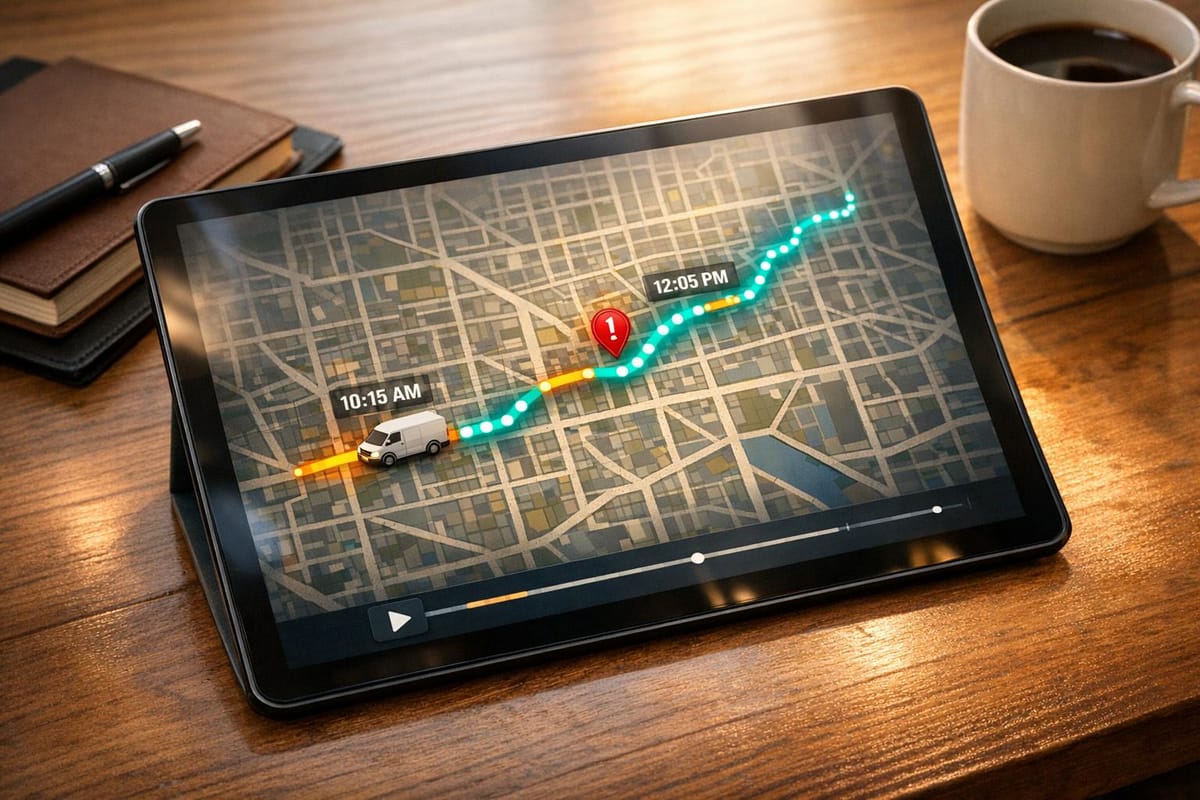
Historical route playback is a feature that lets fleet managers review past vehicle journeys on interactive maps. This tool shows where vehicles travelled, when they stopped, and key events like speeding or idling. By analysing this data, businesses can improve efficiency, reduce costs, and enhance security.
Key benefits include:
- Route analysis: Identify delays, unnecessary mileage, and traffic patterns.
- Driver monitoring: Assess behaviours like harsh braking or speeding for training purposes.
- Theft recovery: Trace stolen vehicles with high recovery rates using GPS data.
- Proof of service: Verify deliveries and address customer disputes with time-stamped data.
With cloud-based access, playback tools offer customisable timeframes, event overlays, and detailed journey logs. This feature is an essential part of modern fleet management, providing insights to optimise operations and improve decision-making.
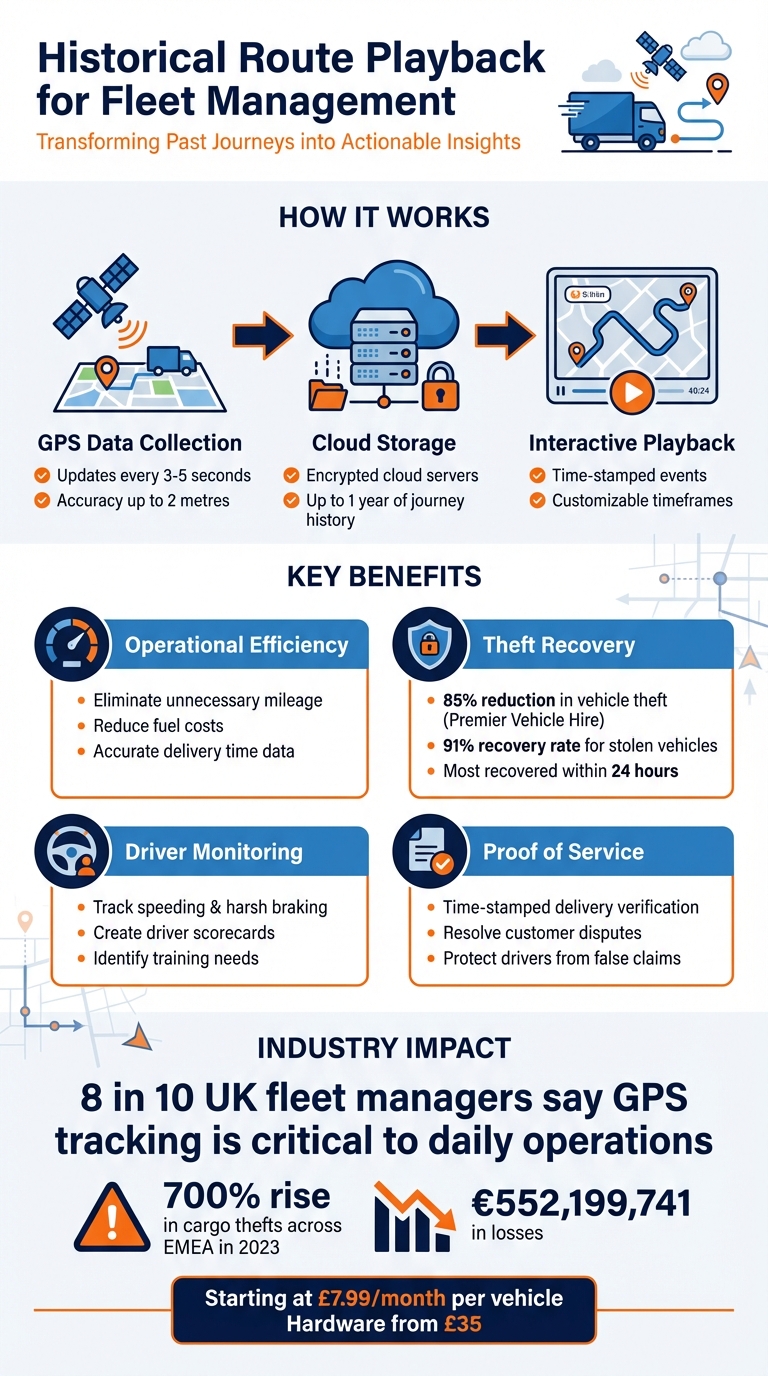
Historical Route Playback Benefits and Statistics for Fleet Management
Mastering FleetStack's Replay View: Analyzing Historical Routes in Detail
What is Historical Route Playback?
Historical route playback - also known as journey replay or trip history - is a telematics tool that allows fleet managers to revisit and analyse the exact routes their vehicles followed over a chosen timeframe. Instead of just tracking where a vehicle is right now, this feature lets you retrace journeys from days, weeks, or even months ago.
This system relies on GPS data collected by tracking devices installed in vehicles. GPS receivers determine location, speed, and direction by triangulating satellite signals, often with an accuracy of up to 2 metres. This data is then transmitted to cloud servers, where it’s transformed into a visual route displayed on interactive maps. With updates as frequent as every 3–5 seconds, the system creates a detailed and precise reconstruction of every trip. What’s more, this playback includes time-stamped markers for key events like engine starts, idling, speeding, harsh braking, and unauthorised stops - giving you not just the "where" but also the "what" of each journey.
How It Works
Here’s a closer look at how historical route playback functions. The data is sent to encrypted cloud servers, where it’s securely stored for long periods - some providers even offer up to a year’s worth of journey history.
Fleet managers can easily access this information by selecting a specific timeframe (for example, the last hour, 24 hours, a week, or a custom date range) and the vehicle or group they want to review. The system then reconstructs the journey on an interactive map. The interface includes controls for speed and zoom, allowing users to pause at specific moments, examine particular segments in detail, or skip forward to areas of interest.
Key Features
| Feature | Description |
|---|---|
| Route Reconstruction | Displays the entire journey on an interactive map, from start to finish. |
| Time-Stamping | Tracks exact start and end times, along with the duration of each stop. |
| Event Overlays | Highlights incidents like speeding, harsh braking, or other notable events. |
| Searchable Logs | Enables filtering by date, vehicle, or driver ID. |
| Map Layers | Lets you switch between street view, satellite imagery, or smart clustering. |
Most modern systems are cloud-based, so they’re accessible through desktop browsers or mobile apps, making it easy to manage journeys on the go. In fact, nearly 8 in 10 UK fleet managers say GPS tracking is a critical part of their daily operations. Historical playback adds a whole new dimension to fleet management, offering insights that go far beyond just real-time tracking.
Benefits for Fleet Management
Better Operational Efficiency
Historical route playback can significantly improve how fleets operate by shedding light on areas where time and resources are wasted. By reviewing trip histories in detail, you can uncover issues like late starts, unauthorised stops, or early finishes - factors that directly affect profitability.
This playback feature also allows you to analyse actual routes taken, helping to eliminate unnecessary mileage and cut down on fuel costs by addressing excessive idling. Plus, having accurate data on delivery times means you can respond swiftly and confidently to customer inquiries with clear, factual information.
These insights not only streamline operations but also tie into the enhanced security and driver monitoring capabilities explored below.
Security and Theft Recovery
If a vehicle is stolen, historical route playback becomes a crucial tool for investigations. It reconstructs the vehicle's exact movements, providing law enforcement with a detailed map of its path up to the point of theft. This feature is even more effective when paired with dual-tracker technology. Even if the primary tracker is disabled, a hidden Bluetooth backup ensures the playback data remains accessible.
Take Premier Vehicle Hire, for example - they reported an 85% drop in vehicle theft after adopting GRS tracking solutions. Moreover, GRS Fleet Telematics boasts an impressive 91% recovery rate for stolen vehicles, with most assets being retrieved within 24 hours.
Beyond theft recovery, historical playback also helps distinguish genuine security breaches from routine operational deviations, making it an invaluable part of a robust fleet management strategy.
Monitoring Driver Behaviour
Journey replay isn’t just about operations and security - it’s also a powerful tool for improving driver performance. By tracking behaviours such as speeding, harsh acceleration, sudden braking, and aggressive cornering, playback data provides a clear, objective basis for driver assessments. This information can be used to create detailed scorecards, identify areas for additional training, and ensure compliance with geofencing rules.
How to Use Historical Route Playback in GRS Fleet Telematics
Accessing the Playback Feature
To get started, log in to your GRS Fleet Telematics account on either the web platform or mobile app. Head to the "Journey History" section on the dashboard, which provides detailed updates on vehicle movements. From there, you can initiate a playback session using the available tools.
Using the Playback Tools
Begin by setting your desired timeframe via the Map Mode Indicator, located in the top right corner of the portal. You can pick from preset intervals like 1 hour, 24 hours, 7 days, or 1 month, or define a custom date range for more specific investigations. Then, select the vehicle or group you want to analyse from the Assets menu.
The playback interface offers speed controls, letting you adjust the replay rate. This flexibility allows you to toggle between a broad overview and a closer examination of specific moments. This feature is especially handy for reviewing incidents or checking driver behaviour. Alongside the map, an event timeline displays alerts, incidents, and stops that occurred during the selected period, providing the context needed for quick and informed decisions.
Customising Data Views
Once playback begins, you can tailor the data views to suit your analysis. Toggle different map layers to explore traffic patterns or see how geofenced zones impacted the route. The event timeline is particularly helpful for investigating safety incidents. For example, you can slow down the playback to scrutinise moments like harsh braking or breaches of geofenced zones, pinpointing the cause of specific alerts.
Additionally, the playback data integrates with automated mileage and usage reports. This is useful for verifying deliveries or protecting drivers against false claims. The "History Replay" feature also allows you to compare routes taken by different vehicles over the same period. This can help identify more efficient paths and cut down on unnecessary mileage, improving overall fleet performance.
Analysing Playback Data for Fleet Optimisation
Playback data does more than just enhance operational efficiency and security - it provides practical insights that can help fine-tune routes and improve overall fleet performance.
Identifying Trends and Patterns
Playback data can uncover where your fleet is losing time and money. By reviewing entire trip routes, you can identify inefficiencies like late starts, unauthorised stops, or early finishes - issues that might otherwise fly under the radar.
One key area to monitor is idle time patterns. When a vehicle idles with the engine running, it wastes fuel and adds unnecessary costs. Automated reports can highlight these idle periods and link them to driver behaviours such as harsh braking or rapid acceleration. These actions not only increase fuel consumption but also cause additional wear and tear on vehicles, ultimately raising your Total Cost of Ownership.
Another critical insight comes from analysing delays at specific times of day. If certain routes consistently face delays during peak hours, playback data can help you identify these bottlenecks. Armed with this information, you can adjust schedules to avoid traffic-heavy periods or reassign vehicles to more efficient routes. Additionally, playback data allows you to examine asset utilisation, identifying vehicles that are underused or routes that could be consolidated. This frees up resources for more productive tasks.
These insights make it easier to develop smarter, more efficient routing strategies.
Using Playback Data for Route Planning
Once trends are identified, historical playback data becomes a valuable tool for improving future routes. By comparing actual and planned routes, you can spot "dead mileage" - unnecessary travel that inflates costs. Analysing past trips in this way can reveal optimisation opportunities that might otherwise remain hidden.
Playback data also helps refine service windows and optimise multi-stop routes. By using time-on-site data, you can set accurate delivery windows and sequence stops to maximise efficiency. Additionally, location history serves as proof of service, helping resolve customer disputes and shielding drivers from false claims. It’s no surprise that nearly 8 in 10 fleet managers in the UK consider GPS tracking essential for their operations, as it delivers this level of operational clarity.
Integrating Playback with Other GRS Fleet Telematics Features
Combining historical playback with other GRS Fleet Telematics tools can significantly improve fleet security and operational efficiency.
Geofencing and Alerts
Geofencing allows you to set up virtual boundaries around critical locations like depots, customer sites, or restricted areas. If a vehicle crosses one of these boundaries, historical playback can provide a detailed route analysis for swift investigation. This feature is particularly useful for theft recovery, especially considering the staggering 700% rise in cargo thefts across the EMEA region in 2023, resulting in €552,199,741 in losses.
As highlighted by Webfleet:
Geofencing acts as a preventive measure against theft. If a vehicle or asset leaves the defined area, an instant notification is sent, allowing for immediate action.
Beyond theft prevention, combining geofencing with playback offers valuable insights for route compliance. By setting up geofences along approved routes, managers can use playback data to confirm whether drivers stick to designated paths, flagging any unauthorised detours or prolonged idling. The combination of timestamped playback and geofence entry/exit records can also serve as proof of service, making it easier to resolve disputes over delivery times or time spent at specific locations.
These geofencing tools also play a role in monitoring driver behaviour, providing an additional layer of data to refine fleet operations.
Driver Safety Monitoring
Integrating playback data with other telematics tools creates a detailed view of fleet performance and driver behaviour. Playback enhances real-time alerts by offering context for safety incidents. For instance, if a harsh braking alert is triggered, playback can reveal whether the driver was reacting to heavy traffic or an unexpected obstacle - insights that can guide more tailored coaching.
Geofenced zones can also be configured with lower speed limits, such as around schools or company premises. Playback data can then be used to review any violations within these zones. Driver scorecards combine playback insights with behavioural data, linking habits like rapid acceleration or excessive idling to increased fuel consumption and vehicle wear. This data-driven approach not only enhances safety but can also lead to lower insurance premiums and reduced Total Cost of Ownership.
Conclusion
Historical route playback is a powerful tool for UK fleet managers aiming for full operational oversight. By examining past journeys, businesses can pinpoint inefficiencies, cut fuel costs, boost driver safety, and strengthen security protocols. Combining historical data analysis with real-time tracking provides a well-rounded approach to tackling both operational and security concerns.
GRS Fleet Telematics delivers an easy-to-use historical playback solution. Featuring real-time updates, dual-tracker technology, and a straightforward platform accessible via web and mobile, it allows managers to review comprehensive journey histories whenever necessary. Its strong recovery capabilities, especially when paired with professional recovery services, highlight its reliability.
This effectiveness is echoed by customer experiences:
"Since implementing GRS tracking solutions, we've reduced vehicle theft by 85% and significantly improved our fleet utilisation." – Sarah Mitchell, Fleet Operations Manager, Premier Vehicle Hire
With pricing starting at just £7.99 per month per vehicle and hardware available from £35, GRS Fleet Telematics makes advanced tracking affordable for fleets of all sizes. Additional features such as geofencing, driver behaviour monitoring, and automated reporting integrate seamlessly to provide a complete fleet management package.
Gain actionable insights, protect your assets, and enhance driver performance with data-driven tools. Historical route playback, when combined with other tracking features, transforms fleet management by turning every journey into an opportunity for improvement. Ready to see it in action? Book a live demo today and explore how GRS Fleet Telematics can meet your fleet's unique needs.
FAQs
How does historical route playback enhance fleet security and support vehicle recovery?
Historical route playback plays a crucial role in boosting fleet security. It allows you to review previous journeys, helping to spot any suspicious or unauthorised activities. If a vehicle is stolen, this tool can retrace its route, making it easier to locate and recover quickly.
Beyond theft recovery, it also aids in prevention. By monitoring driver behaviour, businesses can ensure vehicles are being used properly, cutting down on risks and improving overall safety across operations.
How does historical route playback help monitor driver behaviour effectively?
Historical route playback offers fleet managers a clear window into past journeys. It provides details such as the starting and ending points, stops along the way, and the exact routes taken. This makes it easier to ensure drivers stick to their assigned routes and schedules, while also spotting any deviations or inefficiencies.
Beyond route verification, this tool boosts safety and accountability. It can reveal patterns of risky or inefficient driving and flag unauthorised stops or delays. Analysing this data not only helps safeguard drivers against false accusations but also addresses misconduct when necessary. Plus, it aids in refining routes to save fuel and manage time more effectively. In short, it’s an invaluable resource for improving driver performance and ensuring smoother operations.
How does historical route playback help improve route planning and cut costs?
Historical route playback gives fleet managers a clear view of trip details, helping them spot issues like unplanned stops, late starts, or early finishes. By diving into this data, businesses can adjust routes to cut down on excess mileage, save on fuel, and reduce vehicle wear and tear. The result? Lower running costs.
It also aids in smarter planning by factoring in elements like traffic patterns, weather conditions, and how vehicles are performing. With these insights, fleet managers can fine-tune operations, boost productivity, stay compliant with UK transport regulations, and streamline efficiency - all while keeping expenses in check.