Checklist for Scalable Fleet Software Integration
Step-by-step checklist for integrating scalable, secure fleet software in the UK — assess systems, pick secure APIs, pilot test, deploy and maintain.
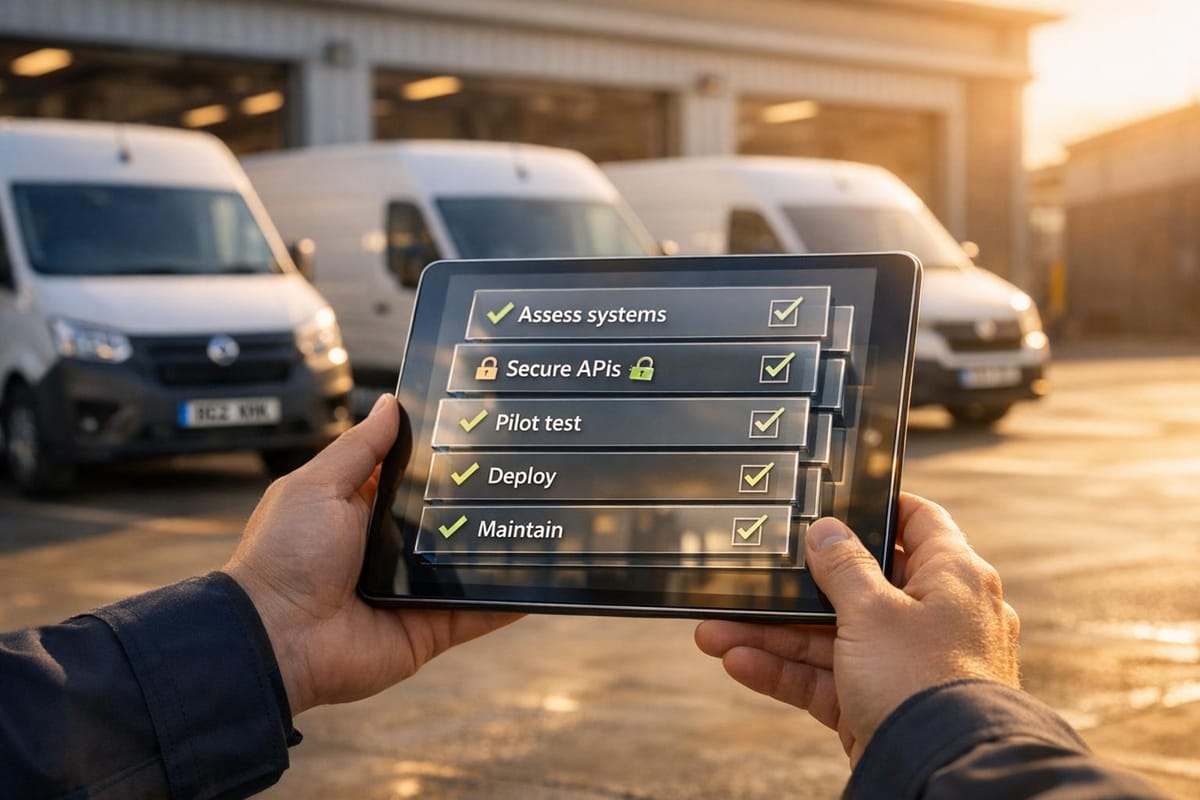
Fleet managers in the UK face the challenge of scaling operations while managing costs and ensuring security. Modern fleet management systems simplify this by offering centralised data visibility, advanced security features, and tools to reduce inefficiencies. Here's how to integrate scalable fleet software effectively:
- Assess Current Systems: Identify inefficiencies in your existing tools (e.g., route planning, fuel management) and ensure compatibility with APIs for future growth.
- Set Scalability Goals: Calculate metrics like vehicle utilisation rates and determine data update requirements (e.g., real-time vs interval-based updates).
- Ensure Compliance: Meet UK GDPR and employment law standards, including informing drivers about tracking and ensuring data minimisation.
- Choose the Right Tools: Opt for systems with secure APIs, dual-tracker technology for theft recovery, and support for both ICE and EV vehicles.
- Test Before Deployment: Use sandbox environments and pilot programmes to validate system performance under real-world conditions.
- Deploy Gradually: Roll out in phases, starting with a small portion of the fleet, and monitor performance to address issues early.
- Maintain Scalability: Regularly review and update systems, explore advanced features like predictive maintenance, and collaborate with providers offering strong support.
With pricing starting at £7.99 per vehicle per month, GRS Fleet Telematics provides flexible, secure solutions tailored to UK businesses, ensuring efficient fleet management as operations grow.

5-Step Fleet Software Integration Process for UK Fleet Managers
Step 1: Review Your Current Fleet Infrastructure
Assess Your Existing Fleet Software and Tools
Start by taking stock of all the systems you currently use - this includes tools for route planning, payroll and invoicing, fuel management, maintenance, and TMS (Transportation Management Systems). These systems often work independently, which can create inefficiencies.
"The key reason to integrate fleet management software is to bring all information into one place to create a more comprehensive overview of business operations." - Teletrac Navman UK
Check if your ERP or CRM systems can interact with other tools via an API. Modern fleet tracking solutions offer a wide range of features, from GPS tracking and engine diagnostics to monitoring driver habits like harsh braking or speeding. They can even track fuel usage and refrigeration temperatures. If your telematics system doesn't support these features, it might not be equipped to handle future growth. Before proceeding, ensure your data is standardised so it can be accurately mapped across different platforms.
Determine Your Scalability Needs
Start by setting clear goals and identifying the technical capabilities required to achieve them. Use the formula (Total Mileage Driven / Total Mileage Capacity) x 100 to calculate your vehicle utilisation rate. This metric helps you understand if your fleet is underused or if additional vehicles are necessary for growth.
Consider how often your system needs to update data. For high-intensity operations, you might need updates every 1–3 seconds, while standard tracking could work with 30–60 second intervals. Identify the types of data you need to share between systems, such as engine diagnostics, fuel transactions, or hours of service. Also, check if your platform supports an Open API to accommodate new data sources in the future. Keep an eye on KPIs like average vehicle downtime, total cost of ownership (TCO), and vehicle cost per mile (VCPM) to gauge whether your fleet is operating at capacity.
Check UK Compliance Standards
Ensure your systems meet the requirements of the UK GDPR and the Data Protection Act 2018, particularly concerning data confidentiality and access control. Under UK employment law, you must inform drivers when tracking is in use, clearly explaining what data is collected and its purpose. Update your employee handbooks to document these practices, including alerts for harsh braking or speeding.
"Under UK GDPR and employment law, employees must be made aware when monitoring takes place, what data is collected, and why it is used." - Movolytics by ABAX
Your systems should follow data minimisation principles. For example, some providers automatically delete vehicle activity records after 12 months to comply with GDPR. Additionally, ensure your platform can generate accurate records of business and private trips to meet UK tax requirements and avoid penalties. Finally, confirm that any hardware installations adhere to vehicle manufacturer guidelines to maintain safety and regulatory compliance.
Once you’ve reviewed your infrastructure, scalability needs, and compliance requirements, you’ll be ready to move on to selecting integration tools and providers.
Step 2: Select Integration Tools and Providers
Choose APIs and Protocols
After reviewing your infrastructure, it's time to pick the right APIs and protocols to ensure smooth data integration across platforms. Look for GPS tracking protocols that provide real-time data transmission, enabling live monitoring and geofencing alerts.
Make sure the system supports CAN Bus and ECU protocols to access engine diagnostics and fuel consumption data. For electric fleets, opt for APIs that deliver real-time State of Charge (SOC) in single percentages, monitor charging status, and track regenerative braking efficiency.
Choose a provider that offers a third-party integration marketplace (e.g., for charging stations and OEM solutions) and APIs with second-level data granularity. This level of detail is crucial for dispatching and theft recovery.
Focus on Security and Data Compliance
When selecting providers, compliance with UK GDPR and the Data (Use and Access) Act 2025 should be a priority. Providers should implement strong security measures like encryption, pseudonymisation, and Cyber Essentials accreditation, along with offering audit rights.
For fleet-specific protection, consider dual-tracker technology. This system uses a secondary Bluetooth or hidden tracker to continue transmitting location data even if the primary GPS device is tampered with or disabled. The ICO advises adopting the "3-2-1" backup strategy: maintaining three copies of data, stored on two separate devices, with one copy kept off-site. Also, verify that the provider's system can restore access to personal data promptly in case of technical or physical disruptions.
By establishing this security framework, you’ll be better positioned to assess the capabilities of potential providers.
Evaluate GRS Fleet Telematics
GRS Fleet Telematics offers secure APIs that integrate seamlessly with workforce management, accounting, and logistics systems. This eliminates the need for manual data entry by automatically gathering CAN Bus and ECU data for engine diagnostics and fuel usage. With 35 years of experience, GRS provides enterprise-level technology starting at just £7.99 per vehicle per month.
Their dual-tracker technology ensures uninterrupted location data, boasting an impressive 91% recovery rate for stolen vehicles. David Mitchell, Director of GreenScape Solutions, shared his experience:
"Managing 15 crews across multiple commercial sites was challenging until we installed GRS van trackers. We've eliminated equipment theft, improved our routing efficiency by 25%, and can now provide clients with verified service completion reports".
GRS also includes advanced analytics and driver scorecards, offering real-time feedback on behaviours like harsh braking and speeding. These insights help identify training opportunities and reduce accident rates. For fleets that include both Internal Combustion Engine (ICE) vehicles and Electric Vehicles (EVs), the platform provides a unified interface to manage all vehicle types. Additional features include white-label options for rebranding, UK-based customer support, and dedicated account management.
With your integration tools and providers selected, the next step is to install and test the system in a controlled environment.
Smart Field Operations: Why You Need to Integrate Fleet Management with Field Service Software
Step 3: Install and Test the Integration
Once you've chosen your integration tools, it's time to set everything up and ensure it works as intended.
Configure Secure Data Mapping
Start by mapping only the essential telematics fields - such as Latitude, Longitude, Speed, Ignition state, and RunningOdo. Use unique vehicle identifiers like NodeId, MIT number, or registration to organise the data effectively. For security, implement session-based authentication, ensuring tokens expire after 60 minutes of inactivity. Structure your data into functional modules - for instance, Vehicles for telematics data, Driver for identification, and Location for coordinates.
To make GPS data more user-friendly, apply reverse geocoding to convert coordinates into readable addresses. Use data queues to avoid duplicate telemetry. If your system encounters errors like rate-limit exhaustion or throttled API keys, set up retry logic with exponential backoff to handle these scenarios efficiently.
Run Staging Environment Tests
Use a sandbox environment to test your API connections without affecting your live system. Validate crucial functions like token issuance, auto-refresh, and handling rate limits. Pay close attention to how the system reacts to common API response codes:
- 2XX: Success
- 400: Bad request or rate limit exceeded
- 401: Unauthenticated
- 404: Not found
- 5XX: Server errors
Ensure all communications comply with security protocols, such as TLS 1.2. Use developer tools to monitor API connections and verify response codes in this controlled environment .
Once the sandbox tests are complete, simulate real-world scenarios to ensure the system performs reliably under operational conditions.
Test Real-World Scenarios
To ensure your integration is robust, simulate scenarios that reflect daily operations. For example:
- Theft Recovery: Disable the primary tracker and confirm that the backup device activates as expected.
- Remote Immobilisation: Test the ability to remotely disable the engine in response to a security alert.
- Geofencing: Check that alerts are triggered immediately when vehicles enter or leave designated zones.
- Driver Behaviour: Simulate events like harsh braking, rapid acceleration, and sharp cornering to confirm accurate driver scorecard data.
- Vehicle Data Accuracy: Verify that location updates, as well as CAN bus or OBD-II data (e.g., fuel consumption, engine diagnostics, and odometer readings), match the vehicle's dashboard .
| Test Scenario | Key Metric to Validate | Expected Outcome |
|---|---|---|
| Theft Recovery | Failover activation | Secondary tracker transmits when the primary is disabled |
| Immobilisation | Response time | Engine disables remotely upon command |
| Geofencing | Alert trigger | Instant notification upon boundary breach |
| API Performance | Rate limit handling | System manages 400/5XX errors without crashing |
| Driver Safety | Event accuracy | Harsh braking/speeding correctly recorded in reports |
Once all tests confirm reliable performance, you're ready to roll out the integration across your fleet.
Step 4: Deploy the Integration Across Your Fleet
After completing system testing, it's time to roll out the integration across your fleet. A phased approach works best here, allowing you to scale effectively while addressing any issues that might arise.
Start with a Pilot Programme
Begin by rolling out the integration to just 10–20% of your fleet. This smaller-scale deployment helps you identify potential problems without causing widespread disruption. Make sure the pilot includes a variety of vehicles, routes, and driver behaviours to get a comprehensive view of how the system performs.
During this stage, involve key stakeholders early to ensure all data touchpoints are accounted for. Run thorough validation tests to detect any anomalies or errors in data transfers before moving to a larger rollout. Typically, onboarding can be completed within 10 days for most fleets. Allocate sufficient time for hardware installation and staff training to minimise downtime.
Once the pilot phase is complete and the system is validated, shift your attention to tracking performance and making any necessary adjustments.
Monitor and Optimise Performance
As the pilot programme runs, keep a close eye on the system to ensure data transfers are accurate and functioning as intended. Pay special attention to critical integration points, such as syncing odometer readings with maintenance schedules, updating driver scorecards, and triggering geofencing alerts.
Set clear performance benchmarks, like accidents per million miles, idle time per driver, and average repair turnaround times. These metrics will help you assess whether the integration is delivering the desired return on investment. Use the data from the pilot to conduct a "plan vs. actual" analysis, comparing real-world performance - such as route adherence and proof of delivery - against your initial optimisation plans. Regularly review this data and fine-tune the system as needed to maintain success.
To ensure a smooth transition, communicate the benefits of the integration - such as improved safety, accountability, and streamlined compliance - to your staff. This can help reduce resistance and encourage adoption.
With the system refined during the pilot phase, you're ready to expand.
Gradually Scale Up
Roll out the integration in stages to maintain stability and give your team time to adapt. Use unified dashboards to provide real-time insights across safety, performance, and maintenance operations. This centralised view allows managers to act quickly and eliminates blind spots in your operations.
As you scale up, continue monitoring key performance metrics to ensure the system adjusts seamlessly to the growing demand. Steady expansion helps maintain control and ensures long-term success.
Step 5: Maintain Long-Term Scalability
Keeping your fleet management system scalable over the long term requires consistent maintenance and strategic updates. Regular reviews and upgrades ensure your system remains adaptable and secure, paving the way for advanced telematics integration.
Add Advanced Telematics Features
As your fleet grows, it’s worth exploring features that go beyond simple tracking. For instance, predictive maintenance uses real-time ECU and CAN bus data to forecast potential component failures. This can help reduce repair costs over time and minimise unexpected breakdowns. Additionally, tools like eco-driving analytics and driver scorecards can identify areas for driver training, which can lead to lower fuel consumption and fewer accidents.
If you’re planning to include electric vehicles (EVs) in your fleet, make sure your telematics platform supports both internal combustion engine (ICE) vehicles and EVs. Features like automated alerts for low battery levels or charging problems can keep your operations running smoothly. For added security, especially for high-value assets, consider dual-tracker technology. This ensures continuous location tracking, even if the primary system is tampered with. GRS Fleet Telematics offers a dual-tracker system that has proven effective in theft recovery scenarios.
Conduct Regular System Reviews
Once your system is up and running, regular reviews are essential to maintain data accuracy as your operations expand. Monitoring the live environment helps ensure that all data transfers between your fleet software and integrated systems remain seamless. Scheduling periodic audits can identify any anomalies, confirm proper data mapping, and address any misalignments as your fleet grows. Adjusting integrations to reflect new business needs or software updates is also a key part of this process.
Using cloud-based Software as a Service (SaaS) platforms can simplify scaling by providing automatic updates without the need for manual hardware changes. Modern Telematics Control Units (TCUs) allow for remote software updates and two-way communication, making long-term maintenance more efficient. To measure the success of your integration, track key performance indicators (KPIs) like vehicle utilisation rates, fuel efficiency, and driver behaviour metrics.
Use GRS Fleet Telematics Support
Collaborating with providers that offer strong support during the maintenance phase can make scaling much smoother. GRS Fleet Telematics, for example, provides UK-based customer service and expert onboarding to help managers and drivers make the most of the system’s features. With pricing starting at just £7.99 per vehicle per month, this platform combines affordability with robust security features.
Work closely with technical support teams to maintain seamless data flow between your telematics system and other business platforms like ERP, CRM, and HR systems via open APIs. Establish a routine for software updates and hardware checks to ensure your sensors and devices continue to deliver reliable data, all while avoiding disruptions during peak operational times. With the fleet management market projected to grow at a compound annual growth rate (CAGR) of 15.5% between 2022 and 2027, reaching a value of USD 52.4 billion, staying ahead with the right support can keep your system competitive and ready for the future.
Conclusion
To successfully integrate scalable fleet software, start by evaluating your existing infrastructure and selecting secure, compliant APIs. Test the system in a staging environment before moving forward, then deploy it through a pilot programme and expand gradually. Long-term scalability requires adding advanced telematics features, conducting regular system reviews, and partnering with responsive support teams. These steps lay the groundwork for a system that prioritises scalability, security, and compliance.
Scalability, security, and compliance are not optional - they're essential. A scalable system grows with your fleet without compromising performance. Security safeguards sensitive telematics data, preventing breaches and ensuring smooth operations. Compliance with regulations like DVSA, O Licence, and GDPR protects you from legal and financial risks.
GRS Fleet Telematics embodies these principles, offering tools that prioritise all three. Its dual-tracker technology achieves an impressive 91% stolen vehicle recovery rate, while open API integration ensures seamless communication with your existing systems, from accounting platforms to logistics software. With pricing starting at £7.99 per vehicle per month, all features are included as standard, avoiding hidden costs as your fleet grows. By following these integration steps, GRS Fleet Telematics provides advanced capabilities and UK-based support to ensure long-term success.
FAQs
What steps should I take to ensure my fleet software complies with UK GDPR regulations?
To make sure your fleet software aligns with UK GDPR, it's crucial to manage personal data - like GPS tracking information and driver behaviour - both lawfully and transparently. Start by establishing a valid legal basis for processing this data, such as legitimate interest or obtaining explicit consent. Be upfront with drivers by providing clear and accessible privacy notices that explain what data is collected, why it’s needed, and how it will be used.
Strengthen data protection with solid security measures, including encryption, strict access controls, and regular system audits. If your software involves high-risk activities, such as monitoring drivers, conducting a Data Protection Impact Assessment (DPIA) is a smart move. This helps you pinpoint and address any privacy risks before they become an issue. Additionally, maintain thorough records of your data processing activities - this includes documenting the purposes for data use, how data flows through your systems, and how long it’s retained. Such records are vital for demonstrating compliance and staying accountable.
By taking these measures, you not only ensure your fleet software meets GDPR requirements but also protect your business and respect drivers’ rights, reducing the risk of hefty fines.
What are the main advantages of dual-tracker technology for fleet management?
Dual-tracker technology offers greater security and reassurance for fleet operators. With real-time theft alerts and an impressive 91% recovery rate for stolen vehicles, it helps minimise the chances of losing valuable assets.
This system plays a key role in keeping your business assets safe, ensuring your fleet stays on the road and protected. It’s a dependable option for securing vehicles throughout the UK, combining high performance with a cost-effective price point.
How can I assess the scalability requirements of my fleet management system?
To determine the scalability needs of your fleet management system, start by examining your current operations and predicting how they might evolve. Think about how the system will handle an increase in vehicles, larger volumes of data, and the need for additional integrations as your fleet grows.
Watch out for potential obstacles like fragmented systems, data silos, or compatibility problems that could hinder scalability. Leveraging telematics data and open API integrations can simplify processes such as real-time tracking, maintenance scheduling, and fuel management. This approach ensures your system stays efficient and adaptable as your business expands.
It’s also essential to consider compliance with data protection regulations like GDPR, which could influence system design as your fleet scales. By analysing your current setup and aligning it with your long-term objectives, you can create a fleet management system that supports growth while prioritising both efficiency and security.