Best Practices for IoT Patch Management in Fleets
Practical guidance for secure OTA updates: live inventory, staged rollouts, rollbacks, timing and compliance for fleet IoT.

If I leave fleet devices unpatched, I increase the chance of downtime, bad data, failed tracking, and cyber attack. The fix is simple in principle: I need a clear patch process, a secure OTA path, staged rollouts, rollback plans, and timing based on when vehicles are idle.
In plain terms, this article says I should:
- keep a live device inventory
- sort patches by risk and urgency
- lock down remote access and split IoT traffic from main IT systems
- send updates with signing, encryption, and device checks
- use canary groups before large rollouts
- make sure devices can roll back after a failed update
- schedule patches around ignition state, battery, and signal
- log every change for audit, privacy, and standards work
A few points stand out straight away:
- A failed update can leave a vehicle offline even when signal is nearby.
- A canary batch of 25 to 50 devices can help me spot faults before they hit the full fleet.
- Post-patch checks should continue for 24 to 48 hours at first, and then for days after release.
- UK fleets also need to think about UK GDPR, because data like VINs and IMEIs can count as personal data.
The short version: patching is not just an IT task. It affects vehicle use, driver trust, compliance, and day-to-day fleet performance. If I treat it as a set process instead of a last-minute fix, I cut risk and keep more vehicles in service.
Below, the article breaks down how to do that step by step.
Build a Patch Governance Framework Before You Automate
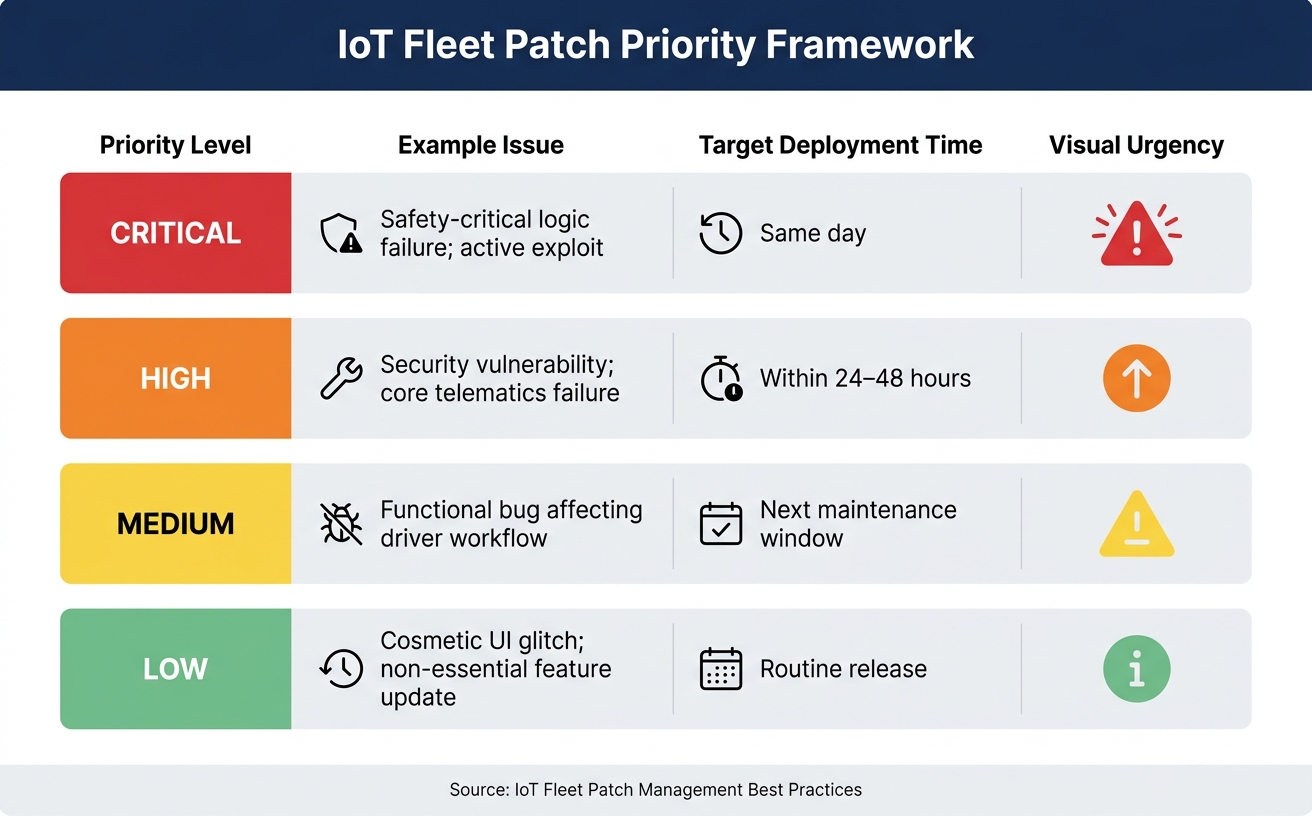
IoT Fleet Patch Priority Levels: Response Times & Approval Paths
Automation makes patching faster. It does not fix a weak process.
Before you push updates across the fleet, set clear ownership, decide how risk will be judged, and keep a live view of every device you manage. If those basics aren't in place, automation just spreads errors faster.
Keep a live inventory of devices, firmware and configurations
Your patch programme is only as good as your asset data. A live inventory should track each device's serial number, hardware revision, installed firmware version, network status, location and vehicle assignment. It should show the actual state of the fleet in near real time.
That matters because risk-based patching depends on knowing exactly what's deployed and where. If a security flaw hits a specific firmware version, you need to find affected devices fast. A live inventory also supports compliance reporting, with an auditable record of what was patched, when it happened and which assets were involved.
It also helps to keep a desired-state record for each device. If a unit needs replacing, you can restore its last known configuration instead of starting from scratch.
In practice, that live inventory becomes the target list for every rollout.
Set patch priorities, deployment windows and team responsibilities
Not every patch needs the same response. Treating every update as urgent burns time and adds risk where none is needed. A simple severity framework splits issues into four levels, each with its own response time and approval path:
| Priority Level | Example Issue | Target Deployment |
|---|---|---|
| Critical | Safety-critical logic failure; active exploit | Same day |
| High | Security vulnerability; core telematics failure | Within 24–48 hours |
| Medium | Functional bug affecting driver workflow | Next maintenance window |
| Low | Cosmetic UI glitch; non-essential feature update | Routine release |
Ownership matters just as much as priority. Patch decisions should sit with a small cross-functional group covering engineering, security, operations, support and legal/compliance. That group can handle standard patches through a planned release calendar, while emergency patches move through a faster path with a named decision-maker.
A one-page runbook for triage, approval, rollout, rollback and communication makes emergency changes far easier to handle.
Control remote access and segment IoT traffic
Remote access to fleet devices should follow a least-privilege model. Each system or user gets only the access needed for its job, nothing more. Telematics units, GPS trackers and cameras should not sit on the same management network as general IT infrastructure. Splitting operational technology (OT) from IT networks limits the blast radius if one device is compromised.
Segmenting IoT traffic also helps protect the services tied to those devices. Good network governance helps keep telematics and security systems steady during patching.
Once access is locked down and traffic is segmented, the next job is securing the update path itself.
sbb-itb-499a7f0
Design a Secure and Reliable OTA Update Process
Once ownership and priorities are clear, OTA design decides how safely patches reach the fleet. For mobile fleets, poor OTA design can put vehicles out of service or leave them running mixed firmware.
Use signed, encrypted and verified updates
Every firmware package should be cryptographically signed with a private key before it leaves your infrastructure. The device then uses the matching public key to check that the update is genuine and unchanged before installation starts. That stops tampered or fake firmware from running on your hardware.
Delivery should happen over TLS-protected connections, with mutual TLS (mTLS) checking both ends - the device and the server. That makes man-in-the-middle attacks during transit much harder. Use an HSM or TPM for key handling, and keep signing keys off build servers and out of device storage. Check the payload against a signed manifest and reject anything that does not match.
Reduce update failure risk with rollback and staged rollout controls
A/B partitioning, or dual banking, keeps a known-good version ready for rollback. The new firmware downloads into an inactive memory partition. The device switches to it only after the payload passes verification. If the new version fails to boot or cannot establish a cellular connection within a set window, the device automatically returns to the previous working version.
Before any broad rollout, deploy to a canary group of 25–50 non-critical devices first. Watch that group for 24 to 48 hours, looking for regressions in GPS fix time, battery drain, or network stability. Move forward only if those devices meet your release thresholds - for example, no increase in crash rates and all devices reconnecting within the expected window.
Use full-image updates for major releases. Use delta updates for routine patches. Default to staged deployment, and keep fleet-wide rollout for urgent security fixes.
Connect OTA patching to fleet telematics visibility
An update that fails quietly can be worse than one that fails loudly. Without van tracking solutions for visibility, a device running old firmware can sit there unnoticed, leaving a compliance gap or a security risk.
A central dashboard should show update status across every device - what version is running, which units are waiting for an update, and which have failed. Failed-update alerts should fire on their own. Monitoring should also look for silent degradation: intermittent sensor drift or delayed synchronisation that will not trigger a normal crash alert but still shows something is off.
Live firmware status feeds straight into rollout decisions. You cannot safely approve the next cohort without knowing how the previous one landed. That visibility makes scheduling, approval, and compliance checks possible. With update status in view, the next step is timing patches so they do not interrupt vehicle use.
Schedule and Automate Patches Without Disrupting Fleet Availability
Once your OTA process is locked down, the next job is practical: getting patches onto devices without sidelining vehicles at the wrong moment. Patch timing should follow live vehicle activity, not a fixed calendar.
Plan maintenance windows around real vehicle activity
The simplest approach is to deploy patches when vehicles are already sitting idle. For UK logistics and delivery fleets, that often means overnight on weekdays, after drivers return to depot and before the morning shift starts.
But don’t rely on guesswork. Scheduling should come from live vehicle state data, including:
- parking state
- ignition state
- battery level
- signal quality
That matters because assumed availability can go wrong fast. A vehicle may be parked but still active. Or it may be idle with a weak mobile signal and not enough battery to finish the update cleanly.
Automation should check vehicle state before any update begins. If a device shows an active ignition signal, low battery, or poor cellular signal, hold the patch and retry it once the asset is back in a stable, idle state. That cuts the risk of half-finished updates on active vehicles. Scheduled depot returns can act as built-in retry windows.
Automate approval, targeting and compliance checks
A central patch workflow cuts the manual work of deciding which devices get which update and when. Device targeting should run automatically, with filters such as hardware version, geographic region, and device model, so incompatible firmware doesn’t land on the wrong hardware. Automated pre-install checks should block incompatible firmware before anything is deployed.
Automate the execution work:
- policy rollouts
- rollback triggers
- compliance logging
- retries
Keep people focused on canary approval and risk classification. Humans should classify risk; automation should only carry out that decision.
Monitor outcomes and prepare for emergency fixes
Track install success by cohort, not just across the whole fleet. Watch results by region, device model, and duty cycle. Then keep monitoring for post-patch regressions in battery, connectivity, or sync performance for days or even weeks after rollout completion.
Automated rollout control also needs a manual escape route. For urgent out-of-band fixes, the same workflow should handle both routine rollouts and incident response. A small emergency change board - usually engineering, operations, and legal or compliance - should approve any accelerated path, while still keeping mandatory regression testing and a pre-tested rollback plan in place.
If a rollout starts showing odd behaviour, pause or roll back the affected devices first, then investigate the root cause.
For fleets using GRS Fleet Telematics, live device visibility feeds this monitoring loop. Feed those results into security reporting and resilience reviews.
Align Patch Management With Security Standards and Long-Term Fleet Resilience
Patch discipline sticks when it follows recognised security rules, not just team habit. Once patch governance and OTA controls are set up, tie them to accepted standards so the whole process stays auditable.
Use recognised security principles for fleet IoT patching
Base fleet patching on recognised security principles, not internal routine. For UK fleets, the NCSC Device Security Principles set the starting point. They require manufacturers to publish minimum support periods, use best-practice cryptography, and make sure updates can be managed at scale. Alongside that, ETSI EN 303 645 requires no default passwords and a clear vulnerability disclosure policy, while NIST SP 800-213A covers device configuration, data protection, and software update capabilities.
For fleets that rely on industrial hardware, IEC 62443 adds rules around network segmentation and authenticated update pipelines. In plain terms, that means updates should come only from a trusted source and must not be changed or corrupted in transit.
The table below shows how the main principles link to day-to-day patch safety:
| Security Principle | What it Protects | Support for Safe Patching |
|---|---|---|
| Update Authentication | Device integrity | Ensures only vendor-approved code is installed. |
| Encrypted Delivery | Data confidentiality | Prevents Man-in-the-Middle attacks during firmware transit. |
| Hardware Root-of-Trust | Boot process | Verifies signatures before execution. |
| Network Segmentation | Fleet resilience | Isolates update traffic from critical telematics data to prevent congestion and cross-segment attacks. |
The EU Cyber Resilience Act pushes connected-device updates further too, including the ability to restore device state. That sets a higher bar for fleets running connected hardware.
Protect UK fleet data while improving patch maturity
Patch telemetry is still data processing, so privacy rules still apply. If a firmware update changes logging or connected features, it can also change how fleet data is collected, kept, or shared. Under UK GDPR, vehicle identification numbers (VINs) and device IMEIs count as personal data. So, any update that changes data collection or retention behaviour needs review under your privacy governance framework.
A simple way to handle this is to keep operational update logs separate from driver-identifiable data. Automated deletion rules should also be in place, so data collected during the update process is not kept longer than needed. Linking OTA patching visibility straight into fleet telematics solutions dashboards can also help teams track real-time vehicle health during updates.
Conclusion: The core practices every fleet should put in place
Taken together, these controls make patching a repeatable resilience process. Fleets that keep a live inventory, classify risk before deployment, secure every OTA update with signed and encrypted delivery, use staged rollouts with tested rollback controls, and schedule patches around actual vehicle activity will cut cyber exposure, protect uptime, and produce the audit evidence that regulators and risk teams expect.
FAQs
How often should fleet IoT devices be patched?
Fleet IoT devices need regular updates as part of a continuous lifecycle management plan, not a fixed schedule. When a patch is needed, deploy it. That’s how you deal with security flaws before they turn into bigger problems.
To cut risk, roll updates out in stages, plan them for off-peak hours, and use automated OTA updates where you can.
What should I do if an OTA update fails mid-rollout?
Ideally, the system should recover on its own. Many modern fleet devices use dual-bank or A/B partitioning. That means the new firmware is stored on an inactive partition, while the current working version stays untouched.
If the update gets interrupted, or the new firmware fails to boot or verify, the device will usually switch back to the previous version. Some systems also retry failed downloads once connectivity returns.
How can I patch devices without disrupting vehicle use?
Use over-the-air (OTA) updates during off-peak hours or while vehicles are parked. A dual-partition setup installs new firmware on an inactive partition, which means the vehicle can keep running as normal until the update is checked and ready to switch over.
To cut risk, use staged roll-outs. Start with a small canary group of 0.5% to 1% of the fleet before rolling the update out more broadly.